Publishing Toolkit
Welcome to the ACEworld Publishing Toolkit. Streamline your self-publishing process with our industry-standard tools for smarter publishing.
Publishing Calculator
Know how much it costs to publish and print your book. Select publishing and print specifications and get instant quotation.
ISBN Validator
The free ISBN Validator tool helps you check if an ISBN is correct and further pulls book metadata from global literary databases. it also converts ISBN-10 to ISBN-13.
Metadata Generator
Boost your book’s visibility with our free AI Metadata Generator. Get high-converting Amazon descriptions, SEO keywords, BISAC categories, and subtitles in seconds.
Cover Calculator
The Book Cover and Spine Calculator provide the exact, print-ready measurements required by global printing presses.
Bulk ISBN Validator
The Bulk ISBN Validator tool is designed for publishers, libraries, and bookstores to verify large lists of ISBNs instantly, and export a clean CSV report.
ISBN Validator
Check if your ISBN is valid, pull data from bookstores, generate barcode, convert ISBN-10 to 13.
Book Metadata Generator
Generate free book description, BISAC categories, Amazon keywords and title suggestions.
ACEworld AI Report
Optimized Metadata for your Book
Report generated by ACEworld Publishers AI
Book Cover Calculator
Know what size your book cover and spine should be. Get visual blueprints including bleed.
Bulk ISBN Validator
Validate large volume of ISBNs at once, copy or export data into an excel sheet.
Enter ISBN List:
Publishing Calculator
Know how much it costs to publish and print your book, print and submit quotation for review.
Publishing Services
Editorial
Design
Legal
Publishing ⓘ
Marketing ⓘ
Print Services
General
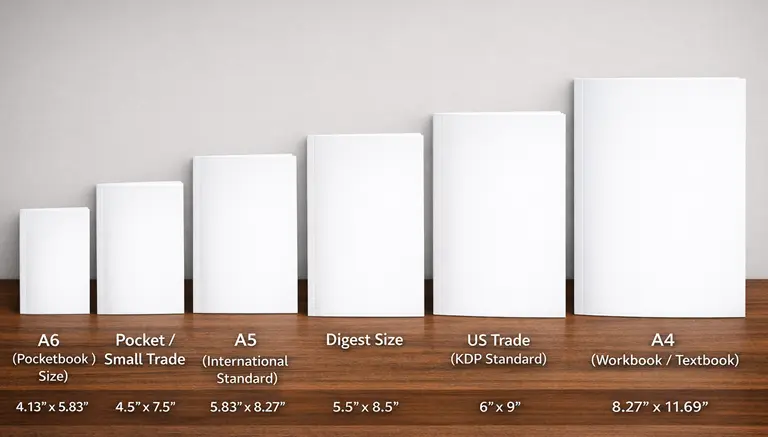
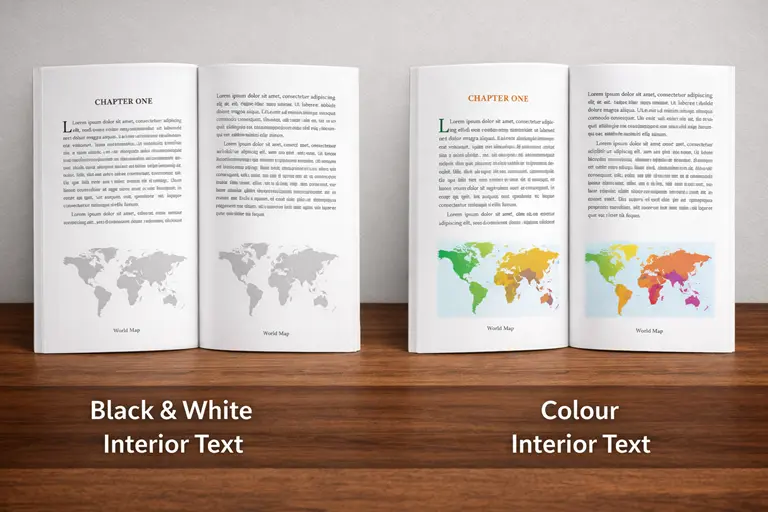
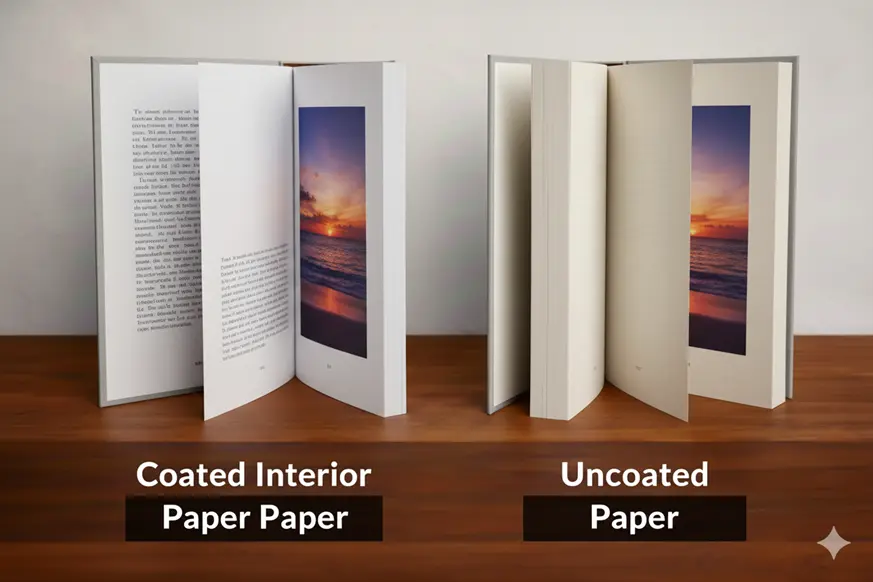
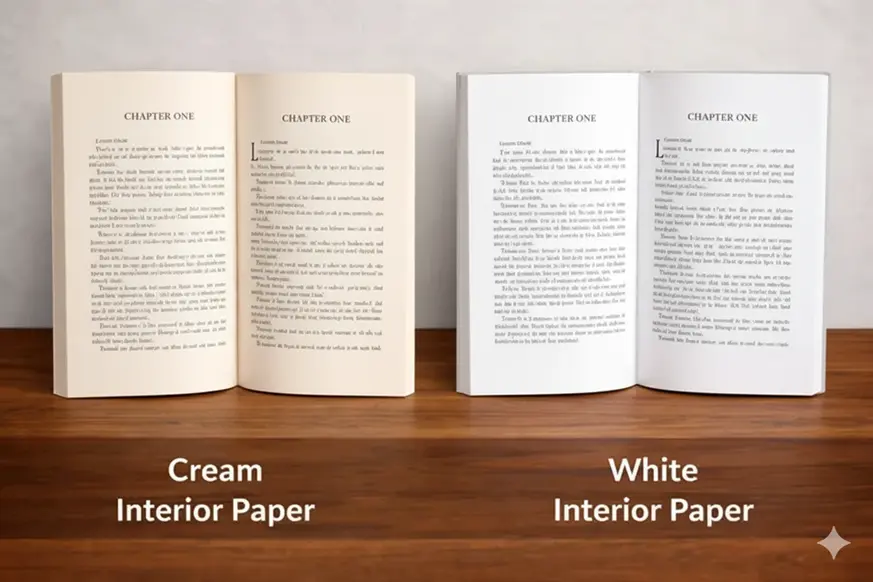
Interior
Cover

Finishing

Quotation

ACEworld Publishing Toolkit
Access ACEworld’s free publishing toolkit for authors and self-publishers. Use ISBN validators, publishing calculators, and essential tools to publish smarter.
The ACEworld Publishing Toolkit is a free collection of essential publishing tools for authors and self-publishers to publish smarter…
Publishing a book shouldn’t be complicated or expensive. The ACEworld Publishing Toolkit is a free collection of essential publishing tools designed for authors and self-publishers at every stage of the book journey. Whether you’re preparing your first manuscript or managing multiple titles, these tools help you make informed publishing decisions with confidence.
Publishing Calculator
The Publishing Calculator helps authors and publishers to quickly estimate the cost of publishing a book. By selecting the services you need—such as editing, typesetting, cover design, ISBN registration, copyright protection, distribution, or printing—the tool automatically calculates an estimated quote for your project.
This makes it easier to understand how different publishing services affect your overall budget and helps you plan your publishing journey more confidently.
Whether you are a first-time author, self-publisher, or organization preparing a book, the calculator provides a fast and convenient way to preview potential publishing costs and generate a formal quotation.
Note: Estimates generated by this tool are indicative and may vary depending on manuscript specifications and project requirements.
ISBN Validator & Converter
The ISBN Validator is a quick and reliable tool that helps authors, publishers, and booksellers verify whether an ISBN is correctly formatted and valid. An International Standard Book Number (ISBN) is a unique identifier assigned to books for cataloging, distribution, and sales across global book markets. Entering an incorrect ISBN can lead to listing errors, distribution problems, or difficulty tracking a book in databases.
With this tool, you can instantly check ISBN-10 and ISBN-13 numbers to confirm that they follow the correct mathematical structure and checksum rules. This makes it especially useful for authors preparing a book for publication or verifying ISBN details before submitting to distributors, libraries, or online retailers.
The ISBN Validator helps ensure your book’s identification number is accurate, compliant, and ready for publishing and distribution. The tool also convert ISBN-10 to ISBN-13, generate barcode and search literary databases for book information.
Book Metadata Generator
The Book Metadata Generator helps authors and publishers create professional book metadata needed for publishing and online distribution. Book metadata includes important details such as book descriptions, keywords, categories, subtitles, and audience targeting, which help bookstores, libraries, and online platforms correctly classify and recommend a book to readers.
With this tool, you simply enter your book title, genre, tone, audience, and a short summary, and the system generates structured publishing metadata in seconds. The output may include multiple description options, SEO-friendly keywords, relevant BISAC categories, and subtitle suggestions that can be used when listing your book on platforms like Amazon or other digital bookstores.
Proper metadata improves your book’s discoverability in search results and bookstore catalogs, helping readers find your book more easily and increasing its chances of reaching the right audience.
Get Professional Book Metadata in 3 Simple Steps
- Input Your Book Details: Enter your book title, genre, and a brief summary. Our AI works best when you provide a clear overview of your story or core message.
- Select Your Tone & Audience: Whether you need a Professional tone for a business book or an Emotional tone for a romance novel, you can customize the output to resonate with your specific target readers.
- Generate & Copy Your Report: In seconds, ACEworld AI analyzes your data to produce three versions of your book description, high-traffic SEO keywords for Amazon/KDP, relevant BISAC categories, and catchy subtitle suggestions.
Book Cover & Spine Calculator
The Book Cover & Spine Calculator helps authors and designers determine the exact dimensions required to create a print-ready book cover. When designing a book cover for print, the file must include the back cover, spine, and front cover combined as a single layout, and the dimensions must be calculated accurately to avoid printing errors or rejection by publishing platforms.
With this tool, you simply enter details such as trim size, paper type, and final page count, and it automatically calculates the correct spine width, full cover width, and bleed area required for professional printing.
The calculator also generates a visual layout blueprint showing how the back cover, spine, and front cover fit together, making it easier to set up your design in software like Canva, Photoshop, or InDesign.
Using accurate cover dimensions helps ensure your book prints correctly, keeps spine text properly aligned, and prevents file rejection during the publishing or printing process.
Creating a book cover is more than just designing a beautiful image; it is an engineering task. To ensure your book looks perfect when printed and bound, our tool calculates three critical factors:
- The Spine Width (The Thickness): The spine is the most variable part of a book. Its width is determined by the.Page Count and the Paper PPI.(Pages Per Inch).
- The Bleed (The Safety Buffer): Printers print on large sheets of paper and then trim them down to your book’s size. Because the blades can shift by a fraction of a millimeter, we add “Bleed” to every outer edge.
- This tool automatically adds the bleed to the top, bottom, and sides of your total layout.
- Important:Your background color or image must extend all the way to this outer edge to avoid thin white lines after trimming.
- The Full Spread (Total Width): To create a single file for your cover, you must account for the back cover, the spine, and the front cover as one continuous image.
Why use this tool?
- Professional Finish: Ensure your spine text is perfectly centered and doesn’t “wrap” onto the front cover.
- Avoid Rejection: Automated systems at KDP and IngramSpark will reject files that are even 0.01″ off.
- Designer-Ready: Copy and paste the exact dimensions directly into Canva, Photoshop, or InDesign.
Bulk ISBN Validator
The Bulk ISBN Validator is designed for publishers, libraries, bookstores, and catalog managers who need to verify multiple ISBN numbers at once. Instead of checking each ISBN individually, this tool allows you to paste or upload a list of ISBNs and validate them instantly in a single process.
The validator checks whether each ISBN follows the correct structure and mathematical checksum required for ISBN-10 or ISBN-13 numbers, helping you identify invalid or incorrectly formatted entries before publishing or cataloging books.
After validation, the tool can generate a clean exportable report (CSV), making it easier to organize book catalogs, manage publishing inventories, or prepare ISBN lists for distributors and databases.
Terms of Use and Legal Disclaimer
1. Disclaimer of Warranties
The ACEworld Publishing Toolkit (the “Toolkit”) and all its individual components—including but not limited to the ISBN Validators, Metadata Generators, and Cover Calculators—are provided on an “as is” and “as available” basis without warranties of any kind, either express or implied.
By using the Toolkit, you acknowledge that:
- Informational Purpose: The Toolkit is intended for general informational purposes only and does not constitute legal, professional, or publishing advice.
- No Guarantee of Results: We do not warrant that the results provided by the tools are 100% accurate, complete, or error-free. The reliability of the output depends heavily on the quality of the user’s input data.
- Third-Party Integration: Certain tools may utilize third-party APIs or external resources. We are not responsible for the availability or accuracy of these external services.
2. Limitation of Liability
In no event shall ACEworld PGS, its developers, maintainers, or affiliates be liable for any direct, indirect, incidental, special, or consequential damages (including, but not limited to, printing costs, loss of revenue, or retail listing errors) arising out of the use or inability to use the Toolkit.
Important Note: Users are strongly advised to manually verify all calculations and metadata before committing to large-scale printing or official book registration.
3. Intellectual Property Rights
All components of the Toolkit, including source code, design elements, algorithms, and documentation, are the property of ACEworld PGS and are protected by international intellectual property laws.
- Authorized Use:You are granted a non-exclusive license to use these tools for personal or professional publishing projects.
- Prohibited Actions: Unauthorized reproduction, reverse engineering, or distribution of the Toolkit’s code or logic is strictly prohibited and may result in civil and criminal penalties.
4. Credits & Attributions
- Barcode Functionality: Barcode generation features are powered by or credited to the Online Barcode Generator.
- Data Sources: ISBN validation logic follows standard ISO 2108 guidelines.
5. Modification of Service
ACEworld PGS reserves the right to modify, suspend, or discontinue any part of the Toolkit at any time without prior notice.
Privacy Policy & Data Handling
1. Data Collection & Usage
The ACEworld Publishing Toolkit is designed with a “privacy-first” approach.
Input Data: Any data entered into our tools (ISBNs, book titles, author names, or dimensions) is processed locally or via secure server-side scripts solely to generate the requested output.
Non-Storage Policy: We do not store, harvest, or sell the ISBNs or metadata you process. Once you close your browser session, the input data is cleared.
2. Cookies & Analytics
We use standard website analytics (such as Google Analytics) to track general usage patterns (e.g., which tool is most popular). This data is anonymized and does not include the specific book data you enter into the tools.
3. Third-Party Links
Our toolkit may contain links to external sites (e.g., the Pricing Calculator or Paystack for Pro access). We are not responsible for the privacy practices or content of these third-party websites.
4. Security
We implement industry-standard security measures to protect the integrity of the toolkit. However, users are responsible for ensuring they are accessing the toolkit via our official domain (aceworldpgs.com) to avoid phishing attempts.
Unlock Pro Features
Some of the premium features or tools in this toolkit are only accessible via a paid key. Getting the key gives you access to features like
- ✅ Bulk ISBN Validations
- ✅ Validation Report Export to CSV
- ✅ Metadata Export to PDF
- ✅ Priority Processing Speed
- ✅ High Resolution Barcode Generation (.CSV) and more
Upcoming Price Increase
From March 1, some of our services will experience price increase. Some of these services include:
- ISBN Issuance
- Formatting
- And a few others.
This is to ensure optimal and timely service delivery from our end, and also due to price increase from some of the relevant authorities.
Release notes
Lists of updates and fixes we do everyday for you. Release notes are presented according to the most recent version.
1.2.2 - March 2026
NEW (Publishing Calculator) Integration of Marketing section and corresponding addon services.
NEW (Publishing Calculator) Integration of Manuscript Transcription service for English, Yoruba and other languages.
NEW (Publishing Calculator) Integration of ISSN request service under legal sub-section.
NEW (Publishing Calculator) Integration of Brochure Design service under Design sub-section.
UPDATE (Publishing Calculator) Proofreading services now standalone (separated from editing tiers.
UPDATE (ISBN Validator) Bookstore archive updated, some unresponsive stores have been removed.
UPDATE (Publishing Calculator) Formatting service renamed "Typesetting & Formatting", and moved to Design Services.
UPDATE (Publishing Calculator) UI optimization for Publishing Service Section (Checkbox to Toggle system).
FIX (ISBN Validator) Storytel bookstore's broken search query fixed.
FIX (Publishing Calculator) Broken Clear Input function updated to work with the toggle system in v1.2.2.
1.2.1 - February 2026
NEW (Publishing Calculator) Added a floating quotation summary for instant price preview.
NEW (Toolkit) Introduced the "Publishing Checklist" download tab on all tools.
UPDATE (Toolkit) Activated Spotlight Mode on the toolkit for smoother experience.
UPDATE (Publishing Calculator) Publishing Calculator can now handle quotation for books up to 1,000 pages.
FIX (Toolkit) Copy Page Link button now works and displays accurately.
1.2.0 - January 2026
NEW (Publishing Calculator) Introduced "Nylon wrapping" as part of print specifications.
UPDATE (Publishing Calculator) Added visual guide to Print Specifications on the Publishing Calculator.
FIX (Publishing Calculator) Checkboxes now displays accurately on tabs.
1.1.0 - December 2025
NEW (Toolkit) Launched the Integrated Publishing Toolkit.